Tasks
Track tasks, bugs, and feature requests across your projects. Create tasks from the dashboard or directly from Claude using MCP.
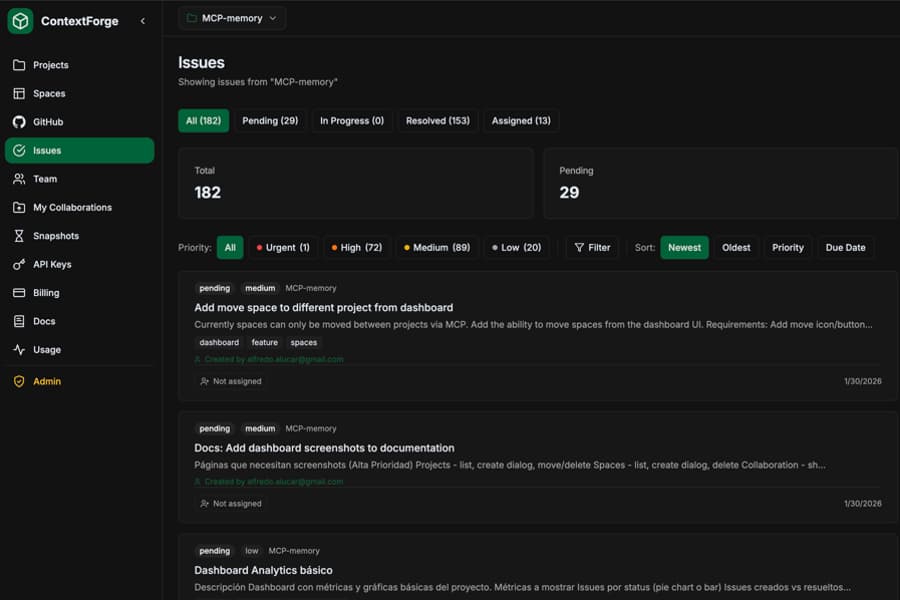
Task Properties
Each task has the following properties:
Title
A short description of the task
Description
Detailed explanation (optional)
Status
pending, in_progress, or resolved
Priority
low, medium, high, or urgent
Assignee
Who is responsible for this task
Due Date
When the task should be completed
Tags
Labels for categorization (bug, feature, etc.)
Project
Which project this task belongs to
Filtering Tasks
The dashboard provides powerful filtering options to find the tasks you need:
By Status
By Priority
By Assignee
By Due Date
By Tags
Filter by any tags you've added to your tasks
Sorting Options
- Newest first (default)
- Oldest first
- Priority (high to low)
- Priority (low to high)
- Due date (soonest first)
Creating Tasks
You can create tasks from the dashboard or directly from Claude using the MCP.
From Dashboard
- 1. Go to Tasks in the sidebar
- 2. Click Create Task
- 3. Fill in the title and optional details
- 4. Set priority, assignee, due date, and tags
- 5. Click Create
From Claude (MCP)
# Ask Claude to create tasks
"Create a task: Fix login button not working"

"Create a high priority task to update the API docs"

"Add a bug: Users can't upload images larger than 5MB"
Managing Tasks
Starting Work on a Task
When you begin working on a task, mark it as "in progress":
"Start working on task abc123"

"Mark the login bug as in progress"
Resolving Tasks
When you complete a task, resolve it:
"Resolve task abc123"

"Mark the API docs task as done"
If the task has no assignee, it will be automatically assigned to you when you resolve it.
Task Comments
Add comments to tasks for discussion, updates, or notes:
"Add a comment to task qion4z: Started investigating the architecture"

"Show me the comments on task qion4z"

"Comment on the login bug: Fixed in PR #42"
Comments are visible to all project collaborators. Task listings also show a comment count indicator.
Assigning Tasks
Assign tasks to collaborators on shared projects:
"Assign task abc123 to john@example.com"

"Assign the login bug to maria@company.com"
MCP Tool Reference
tasks_listList tasks with optional filters.
Parameters
| Name | Type | Description |
|---|---|---|
| status | string | pending, in_progress, or resolved |
| priority | string | low, medium, high, or urgent |
| limit | number | Max tasks to return |
tasks_createCreate a new task.
Parameters
| Name | Required | Description |
|---|---|---|
| title | Yes | Task title |
| description | No | Detailed description |
| priority | No | low, medium, high, urgent |
| tags | No | Array of tag strings |
| due_date | No | ISO date format |
| assignee_email | No | Email of collaborator to assign |
tasks_startMark a task as in progress. Pass the task ID or title.
tasks_resolveMark a task as resolved. Pass the task ID or title. Auto-assigns to you if unassigned.
tasks_assignAssign a task to a collaborator by their email address.
tasks_what_nextGet AI-powered suggestions for which task to work on next based on priority and due dates.
tasks_add_commentNewAdd a comment to a task. Supports task UUID or short_id.
Parameters
| Name | Required | Description |
|---|---|---|
| issue_id | Yes | Task UUID or short_id |
| content | Yes | Comment text to add |
tasks_list_commentsNewList all comments on a task. Shows author, date, and content for each comment.
Parameters
| Name | Required | Description |
|---|---|---|
| issue_id | Yes | Task UUID or short_id |
tasks_deleteDestructivePermanently delete a task. This action cannot be undone.
Search
Use the search bar to find tasks by:
- Title or description text
- Task ID (short or full)
- Tags
Collaboration
Tasks are shared with project collaborators. When you share a project, collaborators can view and work on tasks in that project. You can assign tasks to collaborators by their email address.