Snapshots
Version control for your memory. Save states and restore to any point in time.
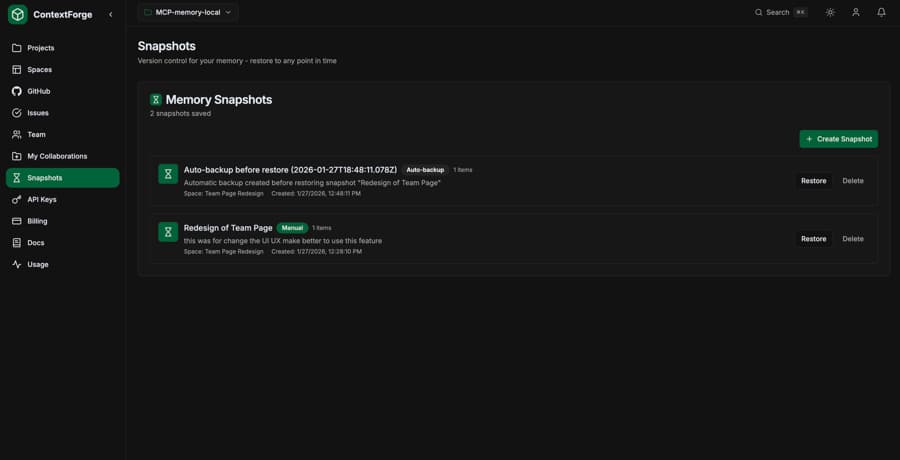
What are Snapshots?
Snapshots are point-in-time copies of your memory spaces. Just like Git commits for code, snapshots let you:
- Save the current state of your knowledge base
- Restore to a previous state with merge or replace modes
- Automatic backup creation before restore operations
- Create checkpoints before major changes
Step-by-Step Guide
Create a Snapshot
Save the current state of a space before making changes.
# Ask Claude:
"Create a snapshot of my API-Docs space called 'Before Migration'"
Claude will create a snapshot containing all items in that space.
List Your Snapshots
View all available snapshots to see what backups you have.
# Ask Claude:
"Show me all my snapshots"
You'll see a list with snapshot names, descriptions, creation dates, and item counts.
Restore a Snapshot
Restore your memory to a previous state. Choose between two modes:
Merge Mode (Default)
Adds missing items from the snapshot without deleting current items. Safe for adding back deleted content.
Replace Mode
Deletes all current items and restores exactly what was in the snapshot. Full rollback.
# Merge mode (safe):
"Restore the 'Before Migration' snapshot using merge mode"
# Replace mode (full rollback):
"Restore the 'Before Migration' snapshot using replace mode"
Auto-Backup: ContextForge automatically creates a backup snapshot before any restore operation, so you can always undo the restore if needed.
Delete a Snapshot
Remove snapshots you no longer need to free up storage.
# Ask Claude:
"Delete the 'Before Migration' snapshot"
Example Conversation
You:
"I'm about to clean up my API-Docs space. Create a backup first."
Claude:
Created snapshot "Backup-2026-01-15" with 47 items from API-Docs space.
You:
"Delete all items tagged with 'deprecated'"
Claude:
Deleted 12 items tagged with 'deprecated'.
You:
"Wait, I need some of those back. Restore the backup using merge mode."
Claude:
Auto-backup created. Restored 12 items from snapshot (merge mode - existing items kept).
MCP Tool Reference
memory_snapshot_createCreate a new snapshot of current memory state.
| Parameter | Type | Description |
|---|---|---|
| space_id | string | Space UUID to snapshot (required) |
| name | string | Snapshot name (required) |
| description | string? | Optional description |
memory_snapshot_listList all available snapshots.
| Parameter | Type | Description |
|---|---|---|
| space_id | string? | Filter by space (optional) |
memory_snapshot_restoreRestore memory to a previous snapshot state.
| Parameter | Type | Description |
|---|---|---|
| snapshot_id | string | Snapshot UUID to restore (required) |
| mode | string? | "merge" (default) or "replace" |
memory_snapshot_deleteDelete a snapshot permanently.
| Parameter | Type | Description |
|---|---|---|
| snapshot_id | string | Snapshot UUID to delete (required) |
Use Cases
Before Major Changes
Create a snapshot before bulk imports, cleanup operations, or reorganizing your spaces.
Project Milestones
Save snapshots at key project phases to preserve context for future reference.
Experimentation
Try different knowledge organization strategies with confidence you can roll back.
Team Handoffs
Create versioned snapshots when transitioning projects between team members.
Best Practices
- 1
Use descriptive names with dates
Include context: "Pre-API-Migration-2026-01-15" or "Before-Cleanup"
- 2
Prefer merge mode for partial restores
Use merge to add back specific deleted items without losing new additions
- 3
Clean up old snapshots regularly
Delete snapshots you no longer need to stay within plan limits
- 4
Trust the auto-backup feature
ContextForge creates a backup before every restore, so you can always undo
Plan Limits
Free
0
snapshots not available
Pro
50
snapshots
Enterprise
Unlimited
snapshots