Security & API Keys
Secure authentication and scoped permissions for your data. Your knowledge stays private and protected.
API Key Authentication
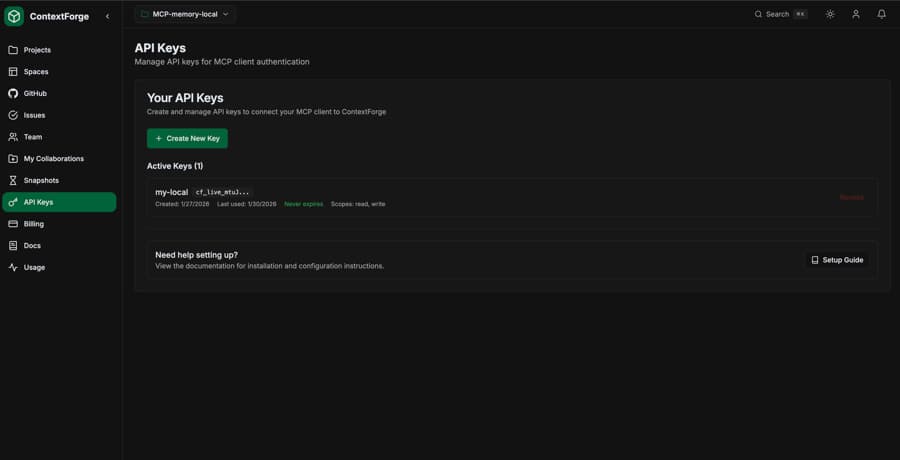
ContextForge uses API keys to authenticate MCP clients. Each key is securely hashed using SHA-256 before storage.
Key Format
cf_live_xxxxxxxxxxxxxxxxxxxxxxxxPrefix identifies key type (live/test)
Storage
Keys are hashed (SHA-256) before storage. We never store plaintext keys.
Creating API Keys
Generate API keys from the dashboard or via the API.
- 1
Go to Settings
Navigate to Dashboard → Settings → API Keys
- 2
Click "Create New Key"
Enter a descriptive name for the key
- 3
Copy your key immediately
The full key is only shown once. Store it securely.
Important:You will only see the full API key once when it's created. Make sure to copy and store it in a secure location like a password manager or environment variable.
Key Scopes
API keys can have different permission levels.
| Scope | Permissions |
|---|---|
| read | Query, list spaces, view items |
| write | Ingest, update, delete items |
| admin | Manage spaces, snapshots, git repos |
| * | All permissions (default) |
Using API Keys
In MCP Client
# Set as environment variable:
export CONTEXTFORGE_API_KEY="cf_live_your_key_here"

# Or in claude_desktop_config.json:
{
  "mcpServers": {
    "contextforge": {
      "command": "npx",
      "args": ["-y", "contextforge-mcp"],
      "env": {
        "CONTEXTFORGE_API_KEY": "your-api-key-here",
        "CONTEXTFORGE_API_URL": "https://your-project-ref.supabase.co"
      }
    }
  }
}
In REST API
# Pass in Authorization header:
curl -X POST https://your-project.supabase.co/functions/v1/query \
  -H "Authorization: Bearer cf_live_your_key_here" \
  -H "Content-Type: application/json" \
  -d '{"query": "authentication patterns"}'
Revoking Keys
If a key is compromised, revoke it immediately from the dashboard.
- Go to Dashboard → Settings → API Keys
- Find the compromised key
- Click "Revoke" - this is immediate and cannot be undone
- Create a new key to restore access
Data Security
Encryption at Rest
All data is encrypted using AES-256 in Supabase
Encryption in Transit
All connections use TLS 1.3
Row-Level Security
PostgreSQL RLS ensures data isolation
SOC 2 Compliant
Infrastructure hosted on SOC 2 certified providers
Best Practices
Use environment variables
Never hardcode API keys in your configuration files
One key per environment
Use separate keys for development, staging, and production
Rotate keys regularly
Create new keys and revoke old ones periodically
Use minimum required scopes
Only grant the permissions each key actually needs
Monitor key usage
Check last_used_at to identify unused or suspicious keys