What Is MCP and Why Every AI Tool Is Adopting It
Six months ago, if you wanted Claude to talk to your database, you wrote a custom integration. If you wanted Cursor to access your project management tool, you wrote a different custom integration. If you wanted Copilot to do the same thing, you started from scratch again.
Every AI tool had its own way of connecting to external services. Nothing was compatible with anything else.
Then Anthropic released MCP, and everything started to change.
MCP in Plain English
MCP stands for Model Context Protocol. It's an open standard that lets AI tools connect to external data sources and services.
Think of it like USB. Before USB, every device had its own cable. Your printer had one connector, your keyboard had another, your mouse had a third. Nothing was interchangeable.
USB fixed that. One standard port, any device.
MCP does the same thing for AI. One standard protocol, any tool.
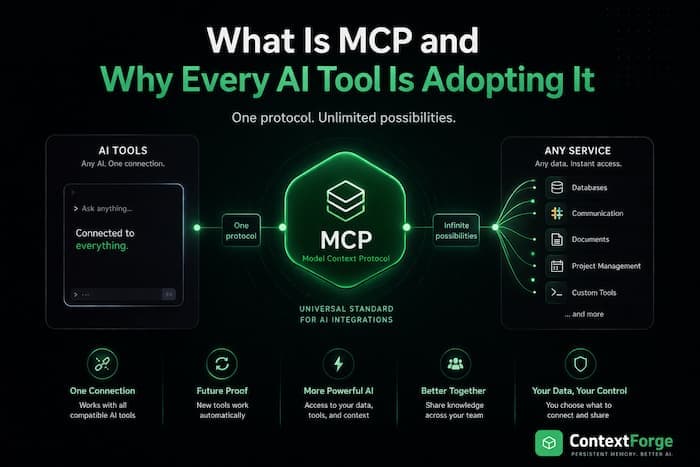
An MCP server is a small program that exposes specific capabilities — reading a database, searching files, managing tasks, accessing an API. Any AI tool that supports MCP can connect to any MCP server. Write the integration once, use it everywhere.
Why This Matters
Before MCP, the AI tool ecosystem was fragmented. Each tool was an island:
- Claude Code could read your files but couldn't talk to your project tracker
- Cursor could index your codebase but couldn't query your database
- Copilot could suggest code but couldn't access your team's documentation
If you wanted to bridge these gaps, you built bespoke integrations for each tool. Most developers didn't bother. The friction was too high.
MCP eliminates that friction. A single MCP server works with Claude Code, Cursor, Copilot, Claude Desktop, ChatGPT, Windsurf — any client that speaks the protocol. Build once, connect everywhere.
This is why adoption has been so fast. In less than a year, MCP has gone from announcement to industry standard. Every major AI coding tool now supports it.
How It Works (The Simple Version)
There are three pieces:
1. MCP Servers — programs that provide capabilities. A Postgres MCP server lets AI tools query your database. A GitHub MCP server lets them read issues and PRs. A memory MCP server gives them persistent storage.
2. MCP Clients — the AI tools themselves. Claude Code, Cursor, Copilot, Claude Desktop. They connect to MCP servers and use their capabilities.
3. The Protocol — the standard they all speak. It defines how clients discover servers, what capabilities are available, and how to call them.
When you connect an MCP server to your AI tool, the tool automatically discovers what the server can do. If the server offers a "search" tool, the AI can search. If it offers a "save" tool, the AI can save. No custom code needed on the client side.
What You Can Do With MCP
The ecosystem is growing fast. Here are some categories of MCP servers that exist today:
Databases: Connect your AI directly to Postgres, MySQL, SQLite, or MongoDB. Ask questions about your data in plain English.
Version Control: Give your AI access to GitHub issues, pull requests, and code reviews. It can read, create, and comment on PRs.
Memory & Context: This is the category I care about most. MCP servers that give your AI persistent memory — so it remembers your project across sessions instead of starting from zero every time.
Project Management: Connect to Linear, Jira, Notion, or Trello. Your AI can create tasks, update statuses, and read project context.
Web & APIs: Servers that let your AI browse the web, call REST APIs, or scrape content.
File Systems: Give your AI access to files beyond the current project — shared drives, cloud storage, specific directories.
The official MCP servers repository on GitHub lists dozens of community-built servers, and new ones appear every week.
Setting Up Your First MCP Server
It's simpler than you'd expect. Here's a real example using ContextForge, which gives your AI persistent memory:
For Claude Code:
claude mcp add contextforge -- npx contextforge-mcp
That's it. One command. Claude Code now has persistent memory.
For Cursor:
Add to your .cursor/mcp.json:
{
  "mcpServers": {
    "contextforge": {
      "command": "npx",
      "args": ["-y", "contextforge-mcp"],
      "env": {
        "CONTEXTFORGE_API_KEY": "your-key"
      }
    }
  }
}
For GitHub Copilot:
Add a .mcp.json file to your project root:
{
  "servers": {
    "contextforge": {
      "command": "npx",
      "args": ["-y", "contextforge-mcp"],
      "env": {
        "CONTEXTFORGE_API_KEY": "your-key"
      }
    }
  }
}
The pattern is the same for every MCP server: tell your AI tool where the server is, and it handles the rest. No SDKs, no API wrappers, no boilerplate.
Why Developers Should Care
MCP changes the economics of AI tool integrations. Before, building an integration meant targeting one specific tool and hoping developers used that tool. Now, you build one MCP server and every AI tool can use it.
This has three big implications:
1. Your tools work everywhere. Switch from Cursor to Claude Code? Your MCP servers come with you. The knowledge, the capabilities, the integrations — nothing is locked to a single tool.
2. The ecosystem grows faster. When a single server works everywhere, more people build them. More servers mean more capabilities for everyone. It's a positive flywheel.
3. AI tools get genuinely useful. An AI that can only read your code is limited. An AI that can read your code, query your database, check your project tracker, and remember what you worked on last week — that's a different kind of tool entirely.
The Bigger Picture
MCP is part of a broader shift in how we think about AI tools. The first generation of AI coding assistants were self-contained — they could read files and generate code, but they lived in a bubble.
The next generation is connected. They plug into your infrastructure, your data, your workflows. They don't just write code — they understand the context around it.
This is what "context engineering" really means. Not just cramming more tokens into a prompt, but giving AI structured access to the information it needs, when it needs it.
MCP makes that practical. Instead of each tool reinventing how to connect to external services, there's one standard that everyone agrees on.
Getting Started
If you want to explore MCP:
- Pick an AI tool that supports it — Claude Code, Cursor, Copilot, Claude Desktop, or ChatGPT all work
- Browse available servers — check the official repository for community servers
- Try one — start with something simple like a memory server or a database connection
- Build your own — the MCP specification is public and well-documented
The standard is open, the tooling is mature, and the ecosystem is growing daily. If you're using AI coding tools in 2026, MCP isn't optional — it's the foundation everything else is built on.
ContextForge is an MCP server that gives your AI persistent memory across sessions. Works with Claude Code, Cursor, Copilot, ChatGPT, and Claude Desktop. Free to start at contextforge.dev.
Share this article